TheSQL LIKE operator is used to perform pattern matching within a specified column of a table. It’s commonly used in conjunction with the % and _ wildcard characters to search for rows that match a specific pattern.
The percent sign (%) represents zero, one, or multiple characters.
The underscore sign (_) represents one, single character.
Syntax:
SELECTcolumn1 , column2 , column3 FROM tablename WHEREcolumnNLIKE pattern;
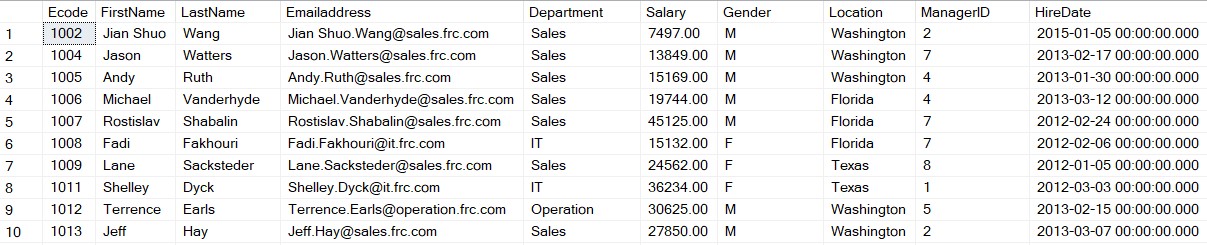
Let’s understand the like operator with an example. For demonstration purposes, we will be using the table emp.
Table Emp
Example:
Objective: In this example, we will retrieve all the records from the Emp table where FirstName begins with the letter A.
SELECT * FROMTbl_EmpWHERE FirstName Like‘a%’;
Output:
Example:
Objective: In this example, we will retrieve all the records from the Emp table where FirstName ends with the letter A.
SELECT * FROMTbl_Emp WHERE FirstName Like ‘%a’;
Output:
Example:
Objective: In this example, we will retrieve all the records from the Emp table where FirstName contains “EN” in any position.
SELECT * FROMTbl_Emp WHERE FirstName like‘%en%’;
Output:
Example:
Objective: In this example, we will retrieve all the records from the Emp table where FirstName has four characters.
SELECT * FROMTbl_Emp WHERE FirstName like ‘____’;
Output:
Example:
Objective: In this example, we will retrieve all the records from the Emp table where FirstName has “e” in the secondposition.
SELECT * FROMTbl_Emp WHERE FirstName Like‘_a%’;
Output:
Example:
Objective: In this example, we will retrieve all the records from the Emp table where FirstName starts with ‘L’ and ends with ‘E’.
SELECT * FROMTbl_Emp WHERE FirstName Like ‘l%e’ ;
Output:
Example:
Objective: In this example, we will retrieve all records from the Emp table where FirstName does not start with “a”.